
Headset Icon1.1.12 - Get APK
You'll be able to download in few seconds.
Publisher Description
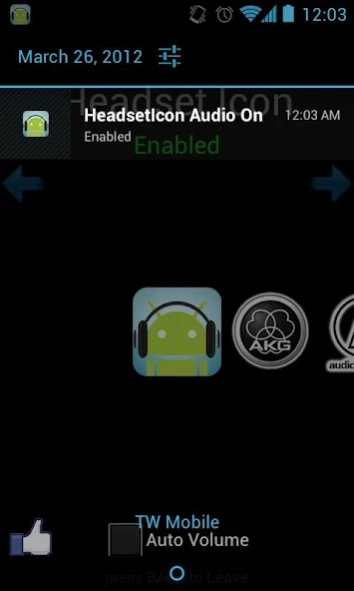

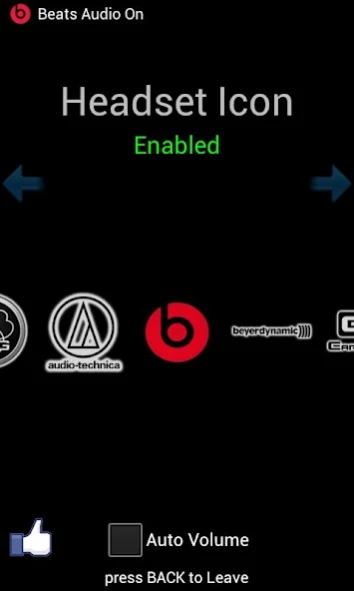

Install Headset Icon for FREE! No advertisement !
Download for FREE Now!!
WHAT IS "Headset Icon" ?
"HeadsetIcon" detects your headset "plug in" or "plug out",it could set the volume by auto and show COOL notification & headset manufacture logo!
THIS APP WILL NOT CHANGE EQ, BUT WILL ADD IN THE FUTURE!!
Functions:
1.Customized your own notification text!!
2.User can choose any app on notification to start!(New)
3."Auto Volume" function.
4.No root required.
5.Show icon with out plugging in your headset.(experimental,user should turn of this in setting and click the image to disable icons.)
-HOW TO USE:
1.Start the HeadsetIcon App.
2.Simply click the image to "Enable" !
4.PLUG YOUR EARPHONES NOW!!!try it!
-HOW TO DISABLE:
1.Start the HeadsetIcon App.
2.Simply click any image to "Disable"!
3.Text will show "Disabled".
-HOW TO USE AUTO VOLUME:
1.Check the Auto Volume checkbox.
2.User needs to set the volume for the first time.
3.DONE! Plug in your headset and try it!
-[NEW] HOW TO USE CUSTOMIZED NOTIFICATION:
1.Press Menu and go to Settings.
2.Write down your own text! anything you want!
3.You must Enable HeadsetService to show customized notification.
Permission explanation:
RECEIVE_BOOT_COMPLETED --> Open HeadsetIcon when boot complete
INTERNET --> You can share with your Facebook friends by pressing the LIKE button
ACCESS_NETWORK_STATE --> Check network status
*HeadsetIcon will run in the background!
*Please DON'T play with your headphone jack by plugging then unplugging, because we DON'T GUARANTEE your headphone jack!
*The HeadsetIcon application is ONLY FOR FUN, there is NO COMMERCIAL purposes.
*Have fun and SHARE with your friends!
Icons :
1.1.0
akg
audiotechnica
beats
beyerdynamic
earsonics
grado
logitech
panasonic(will remove because the graphic isn't good)
philips
sennheiser
somic
sony
ultrasone
1.1.2
Walkman (Sony is too small)
Denon
Android ICS system headset icon
1.1.3
Etymotic
Ultimate Ears
1.1.4
FCC(Federal Communications Commission) (Fun!)
JAYS
SOUL
Klipsch
1.1.5
Better looking Denon icon.
1.1.7
TDK
NuForce
Razer
Dobly
1.1.8
JVC
Koss
1.1.9
Bose
Westone
Sony
1.1.10
Skullcandy
V-MODA
1.1.11
Apple
Marshall
Munitio
Shure(1930 logo)
WeSC
1.1.12
Creative
Razor
Phillips
Soundmagic
MEE
Monoprice
Sol Republic
...more coming soon,we take requests!
If you got some error after updating, contact us,and uninstall the application then reinstall again.
Some users using Xperia encounter a "Device Unsupported" problem.
This problem is a kernel problem that can't fix by "Headset Icon",if you want to make "Headset Icon" function well,please use supported headset,thank you!
If user can't see the image gallery in the middle at the first time user run the app ,check the "Auto Volume" checkbox ,or restart the app to fix this!Using the customize rom might effect the function.
"Using a customize rom might cause the application not work properly! please contact developer."'
IMPORTANT: THIS APP DOES'NT HAVE EQ!
About Headset Icon
The company that develops Headset Icon is Sparks Lab. The latest version released by its developer is 1.1.12.
To install Headset Icon on your Android device, just click the green Continue To App button above to start the installation process. The app is listed on our website since 2012-07-28 and was downloaded 0 times. We have already checked if the download link is safe, however for your own protection we recommend that you scan the downloaded app with your antivirus. Your antivirus may detect the Headset Icon as malware as malware if the download link to com.devandroid.headseticon is broken.
How to install Headset Icon on your Android device:
- Click on the Continue To App button on our website. This will redirect you to Google Play.
- Once the Headset Icon is shown in the Google Play listing of your Android device, you can start its download and installation. Tap on the Install button located below the search bar and to the right of the app icon.
- A pop-up window with the permissions required by Headset Icon will be shown. Click on Accept to continue the process.
- Headset Icon will be downloaded onto your device, displaying a progress. Once the download completes, the installation will start and you'll get a notification after the installation is finished.
Program Details
System requirements
Download information
Pricing
Version History
version 1.1.12
posted on 2012-07-29
✐ Add Creative, Razor, Phillips, Soundmagic, MEE, Monoprice, Sol Republic
✐ Fix some bugs
✐ Please read the manual to know how to use.
version 1.1.12
posted on 2012-07-28
Several fixes and updates
Disclaimer
External Download
We do not host Headset Icon on our servers. We did not scan it for viruses, adware, spyware or other type of malware. This app is hosted by Galad and passed their terms and conditions to be listed there. We recommend caution when installing it.
The APK Download link for Headset Icon is provided to you by apps112.com without any warranties, representations or guarantees of any kind, so access it at your own risk.
If you have questions regarding this particular app contact the publisher directly. For questions about the functionalities of apps112.com contact us.
